

Building a Sustainable Squarespace Website
Conscious Creator’s Guide to a cleaner website design
Build a squarespace That’s Kind
to the Planet and Your Audience
tip: Use clear, concise headlines to improve readability and reduce bounce rates—fewer unnecessary clicks mean less energy wasted.
Learn the what, why, and how of sustainable web design and start a journey toward a lighter, faster, and greener internet.
what
What is Sustainable Web Design?
Sustainable web design focuses on creating websites that are fast, efficient, and environmentally friendly. It’s about reducing your website’s energy consumption while still delivering a seamless user experience.
Stat:
A single webpage view emits
an average of 0.8 grams of CO₂. Multiply that by millions of views, and the impact adds up.
why
why does it matter?
-
Reducing website energy usage cuts global emissions and combats climate change.
-
Sustainable sites are faster, improve SEO, and enhance brand perception.
-
Fast-loading, accessible sites improve user experience and engagement.
Stat: The internet accounts for
3.7% of global CO₂ emissions—more than the aviation industry.
how to build a more sustainable website
how
optimize images before uploading
1
Images significantly impact load times and energy use. Compressing and resizing images ensures faster performance and lower emissions.
-
Decide on the appropriate display size for your image based on its placement on the site. (e.g., 1200px for full-width, 800px for smaller blocks).
-
Use a compression tool like Squoosh or Tinify to reduce image sizes or SmallPDF for documents, without compromising quality.
-
Save the image in a web-friendly format such as JPEG or WebP.
-
Add the optimized image to your site using Squarespace’s Image Block or Gallery Block.
-
Test the page’s load time using tools like Google PageSpeed Insights.
Step-by-Step
Stat:
According to HTTP Archive, on an average, around 64% of a website’s weight is comprised of images.
Resource:
Learn more about Squarespace’s built-in image handling and performance improvements in their Image Best Practices Guide.
Additional Tools:


enable lazy loading for media
2
Lazy loading defers the loading of images and videos until they are in the user’s viewport, reducing initial page load time and conserving bandwidth.
-
Squarespace’s Image Blocks and Video Blocks have lazy loading enabled by default.
-
Ensure all media files are optimized before uploading.
-
Scroll through your site to confirm that images and videos load as they come into view.
-
Use a tool like Google Lighthouse to audit lazy loading effectiveness.
Step-by-Step
Stat:
Implementing lazy loading can improve page load times, enhancing user experience and enhance SEO.
Resource:
Learn about Squarespace’s
lazy loading and how it works in their
Loading Speed Documentation.
Additional Tools:

simplify navigation
3
A streamlined navigation structure enhances user experience, reduces server requests, and minimizes energy consumption.
-
Keep the primary menu concise with 5–7 items.
-
Group related content under a single navigation item using Squarespace’s Index Pages.
-
Add a search bar to help users find content quickly.
-
Ensure navigation is user-friendly on all device types.
-
Utilize Squarespace Analytics to monitor navigation effectiveness and make adjustments as needed.
Step-by-Step
Stat:
60% of potential customers will leave your site if they can’t find what they are looking for.
Resource:
Learn to streamline menus with Squarespace’s Index Page Guide.
Additional Tools:

Use Squarespace’s Built-In CDN
4
Squarespace’s Content Delivery Network (CDN) serves static assets from servers closest to visitors, improving load times and reducing energy usage.
-
Limit main navigation to 5–7 items to avoid clutter.
-
Use Index Pages in Squarespace to group related content under dropdown menus.
-
Include a search bar in the header for easier navigation.
-
Test your navigation on mobile using the Mobile Preview Tool.
-
Monitor user behavior through Squarespace’s analytics to optimize navigation.
Step-by-Step
Stat:
CDNs reduce latency, improving load times and reducing energy use.
Resource:
For more information on Squarespace’s CDN, refer to their File Management Guide.
limit custom code and third-party integrations
5
Excessive use of custom code and third-party integrations can slow your site and increase energy consumption. Squarespace’s built-in tools often provide similar functionality while maintaining sustainability and performance.
-
Review and remove outdated or unnecessary custom code from the Code Injection section.
-
Use Squarespace’s native tools for forms, galleries, and animations.
-
Test your site’s speed using Google PageSpeed Insights.
-
Evaluate third-party integrations and eliminate any that are non-essential.
-
Monitor user behavior through Squarespace’s analytics to optimize navigation.
Step-by-Step
Stat:
Reducing third-party scripts can decrease load times by up to 34%, improving site performance.
Resource:
Learn to streamline menus with Squarespace’s Integrations Help Guide.
Additional Tools:

optimize for mobile users
6
Mobile optimization is critical as over 50% of web traffic comes from mobile devices. A responsive, mobile-friendly design ensures accessibility while reducing energy consumption.
-
Use Squarespace’s Mobile Preview Tool to check the layout.
-
Minimize large images or videos above the fold
-
Streamline navigation menus for easy access.
-
Use Google’s Mobile-Friendly Test to analyze performance
Step-by-Step
Stat:
Scripting is a major source of power inefficiency. Minimizing scripting eliminates inefficient power usage.
Resource:
Explore Squarespace’s Mobile-Friendly Tips for building a mobile-friendly site.
enable dark mode
7
Dark mode saves energy on OLED screens while improving user experience in low-light settings. Squarespace doesn’t offer a direct toggle, but you can design a dark-friendly theme with the Style Editor.
-
Use Adobe Color or Coolors to create a dark color scheme with high contrast.
-
Set darker backgrounds for sections and lighter text for readability.
-
Preview the dark theme on desktop and mobile using Squarespace’s preview tools.
-
Use Contrast to check compliance with WCAG color guidelines.
Step-by-Step
Stat:
Dark mode reduces energy consumption by 10% on average, but can cut up to 42% of mobile energy consumption.
Resource:
To make change to the sites look check out Squarespace’s Making Style Change Guide.
Additional Tools:


reduce fonts and use system fonts
8
Web-safe or system fonts like Arial and Georgia are energy-efficient compared to custom fonts. Reducing the number of font families and styles improves performance and sustainability.
-
Keep the number of font families minimal.
-
Choose web-safe options like Arial, Georgia, or Times New Roman.
-
Limit the use of bold, italics, or multiple weights for each font.
-
Measure the impact of font changes on load speed with Pingdom.
Step-by-Step
Stat:
System fonts minimize font file size minimizing energy usage and optimizing load times
Resource:
Customize fonts with Squarespace’s Typography Guide.
Additional Tools:


optimize 404 pages for
engagement and education
bonus
404 errors are inevitable on any website, but a thoughtfully designed 404 page can turn frustration into opportunity. By providing users with clear navigation, helpful resources, and sustainability education, you can reduce energy waste caused by unnecessary server requests while keeping visitors engaged.
step by step
-
Include links to key sections of your website, such as the homepage, contact page, or popular resources.
-
Allow users to find what they’re looking for without needing to navigate manually.
-
Add a note explaining the environmental impact of server requests and how they can be minimized.
-
Offer CTAs such as “Explore Our Latest Posts” or “Learn About Sustainable Web Design.
-
Preview the 404 page, ensuring it’s responsive, clear, and helpful on all devices.
Stat:
404 errors can increase bounce rates by up to 73%, leading to wasted energy and lost engagement opportunities.
Resource:
Build your own custom error page with the Squarespace Custom 404 Page Guide.
See Our Thoughtfully Designed
404 error Page
Sustainable Strategies for Any Website
resources
While Squarespace supports sustainable design, some features lie outside its functionality. These tips apply to platforms with greater flexibility, like custom-coded sites or those offering choices in hosting, caching, and analytics, helping you boost sustainability and performance.
1. Choose Eco-Friendly Hosting Providers
What to Do:
Opt for hosting services that prioritize renewable energy, such as GreenGeeks or Kualo.
Green hosting reduces your site’s carbon footprint by using renewable energy, lowering its environmental impact.
2. enable browser caching
What to Do:
Reduce server requests by storing static resources (e.g., images, CSS, and JavaScript) in users’ browsers, enabling faster page loads for repeat visitors.
Caching reduces server activity and energy use while improving site speed and user experience.
3. minimize third party tracking scripts
What to Do:
Use lightweight, privacy-focused analytics tools like Fathom Analytics instead of heavy, resource-intensive tools like Google Analytics.
Lightweight tracking scripts load faster, consume less energy, and align with privacy regulations like GDPR.
4. test for carbon emissions
What to Do:
Measuring your site’s carbon footprint helps you reduce emissions and track sustainability progress.
Measuring your site’s carbon footprint helps you reduce emissions and track sustainability progress.
recommended reading
your resource arsenal
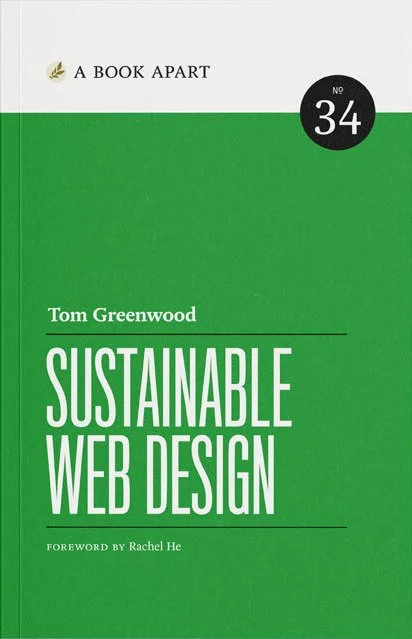
This book offers practical guidance on creating faster, more carbon-efficient websites that benefit both the planet and users.

This book explores how designers can make a meaningful impact by integrating sustainability into their creative process, offering practical strategies for eco-friendly branding, packaging, and visual communication.

This comprehensive guide explores sustainable design principles across various disciplines, providing insights into creating eco-friendly designs.
By using these affiliate links, you’re helping to fuel my mission to save the world, one brand at a time.
Together, we’re turning sustainable design into a real-life superpower!